Thursday, March 30, 2017

Content Marketing Advice, with a Side of Snark

copyblogger weekly

So today is April 1, which usually means we’ll try to feed you some stupid joke that will just make you roll your eyes when you realize the date.

Not this time, internet.

Brian kicked things off on Monday with three ways to get links that you haven’t heard 20 million times from people whose websites have no links. Plus he gets a little snarky, which you never want to miss.

On Tuesday, our friend Jon Nastor showed us how we can actually get listeners for our podcasts. It’s a useful thing to know, since the #1 question on the minds of new podcasters is: “For the love of all that is holy and good, is anyone ever going to hear this thing?”

And on Wednesday, Loren Baker helped you figure out why your site is slower than a slug on Xanax … and how to fix it. Seriously, there’s moss growing on that thing.

Moving to the podcasts: On The Showrunner, Jerod Morris and Jon Nastor discussed sponsorships and affiliate marketing. On Copyblogger FM, I considered the fine balance between being precise with usage and grammar … and just being an annoying jerk. And on Unemployable, Brian Clark talked conversion optimization with Talia Wolf. “Conversion optimization” is another way of saying, “People will actually buy what you are selling,” so don’t miss that conversation.

That’s it for this week … enjoy the goodies, and watch out for April Foolery!

— Sonia Simone
Chief Content Officer, Rainmaker Digital

Catch up on this week’s content


link building is something I’ve never done in my 19 years of publishing online3 Strategic Ways to Get Links to Your Website

by Brian Clark


what if you could spend 10 minutes doing one simple task and get new listeners for years to come?Podcasters: Stop Looking for an Audience (and Let Them Find You)

by Jon Nastor


if a page takes more than a couple of seconds to load, users will instantly hit the back button and move on6 SEO Friendly Tips to Improve Site Speed on WordPress Blogs

by Loren Baker


On Grammar, Usage, and Not Being a Great Big JerkOn Grammar, Usage, and Not Being a Great Big Jerk

by Sonia Simone


3 Conversion Optimization Tactics that Work, with Talia Wolf3 Conversion Optimization Tactics that Work, with Talia Wolf

by Brian Clark


How Bestselling Author Greg Iles Writes: Part OneHow Bestselling Author Greg Iles Writes: Part One

by Kelton Reid


Sponsorships or Affiliate Marketing: Which Is Better for Your Podcast?Sponsorships or Affiliate Marketing: Which Is Better for Your Podcast?

by Jerod Morris & Jon Nastor


The post Content Marketing Advice, with a Side of Snark appeared first on Copyblogger.


from Copyblogger http://ift.tt/2oempyi
via IFTTT

Wednesday, March 29, 2017

6 SEO Friendly Tips to Improve Site Speed on WordPress Blogs

"If a page takes more than a couple of seconds to load, users will instantly hit the back button and move on." – Loren Baker

In the world of SEO, user experience on websites has always been a factor, as has the time it takes for a site to load.

However, with the use of mobile devices surpassing desktop use (in most consumer-facing industries) and the wide adoption of broadband, people expect sites to load instantly.

Long gone are the days of waiting 10 seconds for a site to load.

If a page takes more than a couple of seconds to load, users will instantly hit the back button and move on to the next result.

Accordingly, Google officially started paying attention to site speed and declared its importance as a factor in rankings.

In order to keep up with Google’s site-ranking measures, WordPress blog users need to know exactly what they can do to improve their own site speed.

Remember when Google rolled out AMP (accelerated mobile pages)?

They now serve up publisher content in a simplified Google hosted experience that renders superfast. I like AMP from a user perspective because I know that AMP content will load incredibly fast on my mobile device, but as a publisher:

I’d rather speed up my blog and attract traffic directly to my site than have users stay on Google.

If you use StudioPress Sites or the Rainmaker Platform, your site will already load quickly. However, adding ad scripts, featured images, tracking codes, 301 redirects, etc. will slow down the loading of a site and increase demand on your server/hosting company.

Here are six simple tips I recommend since we used them to dramatically speed up the Search Engine Journal (SEJ) load time — it’s at 1.8 seconds!

1. Use a content delivery network

A content delivery network (CDN) is a group of servers that deliver web pages and other content according to the location of the user, the webpage origin, and its server.

It can handle heavy traffic and speeds up the delivery of content to different users.

For WordPress blogs looking to improve site speed, Cloudflare is a great tool to consider. Cloudflare offers a free content delivery network that speeds up the performance of your site and optimizes it for efficiency on any device.

It also offers security services that help protect websites from crawlers, bots, and other attackers.

2. Compress your images

Another effective way to reduce page-load time and increase site speed is by compressing your images. A CDN will help with this, but it doesn’t take care of 100 percent of the job.

There are several different plugins available that compress all the images on your website — and even compress new images as you upload them as well.

ShortPixel is a WordPress plugin that allows you to compress both new and old images on your blog. We use it on SEJ and various other sites, and absolutely love it.

It allows you to quickly compress images in batches for greater convenience, reduces the time it takes to do backups, and ensures all your processed files are kept safe and secure. The best part about it is that your image quality stays the same, regardless of the size of the image.

Other image-compression plugins also maintain the quality of your pictures and improve site speed.

3. Prevent ad scripts and pop-ups from slowing down the user experience

Many web pages today contain some form of third-party script that either runs ads for revenue or uses pop-ups to promote conversion. You want to build your audience and get more customers of course, but balance is key here.

Although it’s difficult to completely get rid of them to improve your site speed, you can tame their performance impact while keeping them on your website to provide their intended benefits.

The trick is to first identify the third-party scripts that run on your site, where they come from, and how they impact your blog.

You can use different real-time monitoring tools that track and identify which scripts delay your site-loading time and affect your site metrics.

One of my favorite tools to do this is Pingdom’s Website Speed Test, because it breaks down each file and script, and tells you which takes the most time to load.

The same rule applies for pop-up plugins that you add on to your site.

Knowing which ones work best to improve conversions and bring in email signups allows you to gauge which plugins to keep and which ones to uninstall.

One of the fastest pop-up plugins on the market is OptinMonster (a StudioPress partner). Its founder, Syed Balkhi, is a WordPress expert who stays on top of factors like site speed and overall user experience.

4. Install a caching plugin

Another effective way to reduce site-loading time is by installing caching plugins to your WordPress blog.

Caching plugins work by creating a static version of your WordPress blog and delivering it to your site users and visitors, which conveniently cuts your page-loading time in half.

Several cache plugins work best for WordPress, such as WP Super Cache and W3 Total Cache.

These plugins are easy to install and can be disabled anytime. They allow you to select certain pages on your blog (or all of them) to cache, and offer many other content compression settings that you can turn on or off.

WordPress supports many other plugins that allow you to optimize your blog to get rid of any latency in page-load time. It is important to test out these plugins to find the one that works best for you.

5. Disable plugins you don’t use

Tons of WordPress plugins can also make your site super slow, especially ones you don’t need.

It is important to review the plugins you have installed in the past and disable those that offer no significant value.

Many WordPress users install different plugins when they first create their blogs to enhance how they look, but realize over time that great-looking blogs don’t always attract traffic, especially if your page-loading time is slow.

Also, I would highly recommend making sure your plugins are updated. This may help improve page-load speed, but more importantly, it makes your site more secure.

6. Add one more layer of media optimization

One thing we realized at SEJ when speeding up the site was that even after optimizing images, ad scripts, and caching, there were still multiple forms of media that slowed down load time.

The internal fixes we implemented did not help with third-party media load times, such as embedded Twitter, YouTube, and Instagram content, or infographics from other sites.

One solution we found to assist with that is BJ Lazy Load. Essentially, this lazy-load plugin renders all written content first, then as the user scrolls down the page, images and other forms of media load. This way, the user doesn’t have to wait for tons of media to load before reading the main content.

What I really like about BJ Lazy Load is that in addition to images, it also lazy loads all embeds, iFrames, and YouTube videos. For a WordPress blog that uses a lot of embeds, it was ideal for us.

Bonus tip: ask your web host for help

If you run a WordPress blog or WordPress-powered site, then you should work with a hosting company that specializes in WordPress, such as WP Engine, Presslabs, or Rainmaker’s own Synthesis.

I’ve worked with all three, and one thing I can absolutely tell you is that if you contact them and ask how your site can be sped up, they will help you because the faster your site is, the less load on their servers.

As more and more people turn to mobile devices to access the internet, it is essential to optimize your blogs for mobile use and find ways to minimize page-loading time.

Remember, bounce rates increase when your page-load time is slow, which impacts whether or not your content gets read or skipped for other sites that load pages faster.

The post 6 SEO Friendly Tips to Improve Site Speed on WordPress Blogs appeared first on Copyblogger.


from Copyblogger http://ift.tt/2mPw3qV
via IFTTT

Tuesday, March 28, 2017

Podcasters: Stop Looking for an Audience (and Let Them Find You)

"What if you could spend 10 minutes doing one simple task and get new listeners for years to come?" – Jon Nastor

“Three … two … one … Ready or not, here I come!”

My daughter Sadie hides anxiously behind the living room couch, while her best friend is searching, calling out her name, and trying to find her.

Hide-and-seek, a game played out millions of times.

If you don’t know, hide-and-seek is a popular children’s game in which any number of players conceal themselves in the environment, to be found by one or more seekers.

The hiding is not what makes it fun.

Kids will play for hours and hours when they continually find each other. When one of the children stays hidden for even five minutes too long, the others quickly lose interest.

It is a quest fueled by the moment of discovery.

Hey podcaster, stop hiding behind the couch

Now let’s think about why thousands upon thousands of content marketers, business owners, hobbyists, and fans start podcasts. More often than not, it’s to build an audience around a topic they love.

They start with enthusiasm and determination, only to quit after 10, 12, or 20 episodes (the number doesn’t matter, the quitting does).

Listeners couldn’t find their podcasts, so they quit. Like Sadie hiding behind the couch, when no one finds us, the game ceases to be fun and we quit.

Podcasts need to be actively optimized — not only to help you build an audience and authority, but also to help you stay motivated to not quit.

The search begins

The consensus amongst podcasters is that since Google can’t index audio, you can throw your standard SEO practices out the window.

It is true; Google can’t listen to or index your podcast episodes. It is also true, and more pertinent to this discussion, that Google is not where people go to find podcasts.

Where do people search when they want to find a new podcast?

  • iTunes
  • Google Play
  • Stitcher
  • iHeartRadio
  • YouTube
  • Spreaker
  • SoundCloud

These are “alternative” search engines — directories where people search for podcasts.

It’s not accidental when podcasts rise to the top of the directories. We need to understand our audiences and anticipate what they search for just like we do when we write, but with a slight twist.

Why you should submit your show to podcast directories

What if you could spend 10 minutes doing one simple task and get new listeners for years to come?

We need to find audience-building strategies we can leverage. Repeatable steps we can take upfront, yet will continue to provide us with new listeners for months and years to come.

The way to do this is simple: submit your show to podcast directories.

As with most things, how you use podcast directories will change and evolve with your show. A brand-new show will benefit from a different strategy than a podcast that has been around for 50+ episodes.

  • New podcasters: Focus on one or two directories to maximize early exposure. Use iTunes and Stitcher to start.
  • Veteran podcasters (50+ episodes): Submit to as many podcast directories as possible. Here’s a list to get you started.

Optimize for discoverability

As podcasters, we value audio over text. The reason is simple: we are more comfortable behind a microphone than we are behind a keyboard.

Our thoughts and ideas flow when we speak, and we stare impatiently at a blank page when it’s time to write.

Don’t fight it. It’s what makes us podcasters.

It also stops us from being found.

There are a few places where words matter in podcasting. Not a lot of words, but they are essential to help listeners find your show.

For our discussion today about optimizing for discoverability, we are not going to get into anything involving extra work. Yes, having transcripts for your show can be beneficial, but we are focusing on tasks you already must do for your podcast — but doing them with a purpose.

How to win the name game

Deciding on a name for your show can be a fun and creative process, but we need to stay focused on our goal of discoverability.

Here are three things to keep in mind when naming your show for discoverability:

  1. Know your audience. Who are they, where do they listen, and how can your show help them?
  2. Use their words, not yours. How would a listener describe your show to a friend? Use those words.
  3. Stand out. Be bold and clear.

Next time you’re on the subway or at a coffee shop, look at how fast people scroll up and down on their phones.

Your name needs to effectively communicate your show’s purpose, and it needs to do it in seconds.

A good name isn’t easy to find, but never sacrifice clarity for creativity.

Craft a better show description (your elevator pitch)

Where a show description is displayed varies from directory to directory. Currently, iTunes still generates the majority of all podcast downloads. So we will focus on iTunes when discussing show descriptions.

A show description is the block of text displayed on your podcast page within iTunes. More importantly, it is the main place where you get to tell iTunes and potential listeners what your show is about.

Here are three ways to optimize your show description:

  1. Choose the right keywords. Include the words and phrases your audience uses.
  2. Max it out. iTunes has a 4,000-character limit — use every last one.
  3. Call to action. Listeners will read your show description, so explain what they should do next.

Think of crafting your show description the same way you would think about writing your next blog post.

Keywords matter, but not more than other important elements that help you create a compelling case for a potential listener to download and subscribe to your show.

Write captivating episode titles

Content marketers and copywriters stress over their headlines more than any other part of their work. It makes sense when we understand how a headline can make or break an article.

“On the average, five times as many people read the headline as read the body copy. When you have written your headline, you have spent eighty cents out of your dollar.” – David Ogilvy

The title of your episode is your headline. It is the single most powerful way to make people stop scrolling and listen to an episode. So don’t treat episode titles like afterthoughts.

Here’s how to write better episode titles:

  1. Don’t mislead. The goal is to attract listeners, not make them despise you for wasting their time.
  2. Be specific. What is the single most useful benefit your episode will provide? Yes, be that specific.
  3. Consistency is key. Number your episodes or don’t. Include your guests’ names in your titles or don’t. Either way, be consistent.

Writing great episode titles takes practice. When you get stuck, you can jump-start your process with these smart headline-writing tactics.

Make noise from behind the couch

When you listen to kids playing hide-and-seek, you will notice all of the noises they make — laughter, whispering, and yelling — all signals that will help them be found.

We need to make noise, get noticed, and be discovered.

Creating useful content on a consistent basis is essential if you want to create a remarkable podcast.

Your usefulness stems from your passion and knowledge.

Podcasting is hard, but having your show discovered by new listeners on a consistent basis will keep you motivated through the dips and struggles.

You started a podcast to build an audience. Don’t hide it from listeners.

The post Podcasters: Stop Looking for an Audience (and Let Them Find You) appeared first on Copyblogger.


from Copyblogger http://ift.tt/2ocDpBw
via IFTTT

Monday, March 27, 2017

3 Strategic Ways to Get Links to Your Website

"'Link building' is something I’ve never done in my 19 years of publishing online." – Brian Clark

“Link building” is something I’ve never done in my 19 years of publishing online. In other words, I’ve never spent any time whatsoever emailing strangers and trying to convince them to link to my content.

I have, however, been on the receiving end of many link-building requests. And they’ve never worked on me.

Now, I know there are smart people who work on behalf of clients to get links through these outreach initiatives. Strangely, I’ve never received a link request from a smart person.

It’s usually just dopey people using bad email scripts and automation that some clown sold them on. They don’t even bother to modify the language, so you see the same lame emails over and over.

Outside of receiving compensation for a link (which I would never accept and is just a bad idea in general these days), I don’t see why any online publisher would agree to these requests. What’s in it for us?

So, if you’re looking to get links to your site for all the benefits that come with it (including enhanced search rankings), maybe you should try a different approach.

Let’s look at three that might work for you.

1. Guest posting

Not a new approach, certainly. But guest writing for relevant and respected publications remains one of the best ways to gain exposure to an audience that builds your own. And of course you’ll want, at minimum, a bio link back to your site in exchange for your content contribution.

Now, you may remember that Google at one point spoke out against guest posting for SEO. Yes, spammy sites submitting spam to other spammy sites in exchange for links is not smart — but that’s not what we’re talking about.

I’m also not necessarily talking about content farms like Forbes and Business Insider, although if that’s where your desired audience is, go for it. You’ll likely have better luck, however, with beloved niche publications that cater to the people you’re after.

What you’re looking for is a place that you can contribute on a regular basis, rather than a one-shot. Not only will the audience begin to get familiar with you after repeat appearances, the publisher will value and trust you, which can lead to coveted in-content links to relevant resources on your site rather than just the bio link.

What if a publisher doesn’t allow links back to your site? Move on. It’s not just about SEO — if a reader is interested in seeing more of your work, they should be able to simply click a link to do so. That’s how the web works.

If you’re limited to a bio link, see if you can point to something more valuable than your home page. A free guide or course that gets people onto your email list is the primary goal ahead of SEO.

2. Podcast interviews

The explosion of podcasting, especially the interview format, is a potential boon for exposure and links. In short, podcasters need a constant supply of guests, and you should position yourself as a viable option.

The links appear in the show notes, and this can be a great way to get citations to your home page, your valuable opt-in content, and your most valuable articles. But you have to find a way to get on the show in the first place.

This may be more doable than you think, because as I said, podcasters need a constant supply of fresh guests. And take it from me — we’re looking for new and interesting people outside of the typical echo chamber that exists in every niche.

For example, recently Joanna Wiebe of Copy Hackers introduced me to Talia Wolf, someone I was unfamiliar with. I trust and respect Joanna, so I checked out Talia. Next thing you know, I’m interviewing Talia (her episode of Unemployable comes out tomorrow) and I ended up linking to three of her articles as well as a page that contains her free conversion optimization resources.

The key, of course, is to do great work that reflects you know what you’re talking about. Then do your research:

  • Find relevant podcasts.
  • Take the time to understand the show, its audience, and its host.
  • Send a friendly note explaining why you would be a solid interview.

Don’t be shy; it’s just a (well-written) email, and podcasters want you to convince them to be their next guest. Or get someone who knows both your work and the host to recommend you. There are even podcast interview booking agencies cropping up that will do the outreach for you.

3. Tribal content

In the early days of Copyblogger, it was all about creating hugely valuable tutorial content that naturally attracted links. It’s harder these days, because most people tend to share that type of content on social channels rather than blog about it like back in the day.

You can still make it happen, though, with the right content and the right relationships with other publishers in your niche. It hinges on leveraging the powerful influence principle of unity, or our tribal affiliations with like-minded people.

Tribal content is all about resonating strongly with people who believe the way you do on a particular issue.

Rather than just “you’re one of us,” it’s more effective when it’s “you’re different like we’re different.”

For example, one of our prime tribal themes involves the dangers of digital sharecropping, or publishing content exclusively on digital land that you don’t own and control. We didn’t coin the term (Nicholas Carr did), but often when the topic comes up, there will be a mention of Copyblogger.

It works the other way, too. Whenever I see a solid piece of content that warns against digital sharecropping, I share it on social. And there’s a good chance I’ll link to it as outside support the next time we talk about the topic. You know, like this and this.

If there is an important worldview within your niche or industry that other online publishers share, it’s likely important that they make the case to their audiences. With tribal content, you’re providing an important message that supports part of their editorial strategy as well as your own.

That’s how the truly powerful links to your site happen. So start making a list of unifying concepts that you share with others in your arena, and make sure your relationships with those publishers are solid before you unleash your epic tribal content.

Wait … I was wrong

Now that I think about it, one link-building email almost worked on me. It was one of those cookie-cutter templates asking me to swap out a link in the web archive of my personal development newsletter Further.

When you curate content as I do with Further, linking to other people’s stuff is what it’s all about. So I took a look at the suggested resource, and it was surprisingly good.

I wrote back to say I wasn’t going to replace the old link, but I would include her resource in the next issue. Unfortunately, this person didn’t respond over the next several days.

What I got instead, just a day before publication, was the next automated email in her sequence, asking me if I had seen the original email that I had already replied to. Deleted that email, deleted the link to her resource in the draft issue, and included something else instead.

Which brings us to an important principle in both link building and life:

Don’t be a dope.

The post 3 Strategic Ways to Get Links to Your Website appeared first on Copyblogger.


from Copyblogger http://ift.tt/2n9DzIZ
via IFTTT

Friday, March 24, 2017

How to Find an SEO You Can Trust: Weekly Forum Update

Hello again! Since I last wrote an update, Spring has arrived! Hopefully a lot of you are enjoying some slightly warmer weather between bouts of wrestling with Google.

We’ve got a lot of great news threads from WebmasterWorld and Cre8asiteforums this week, as well as our title thread from SEO Chat!

I think it’s pretty common knowledge in the business and SEO worlds that sometimes people get burnt. Sometimes a business hires an SEO who can talk circles around them, but they either provide no results or wind up doing damage.

It’s also difficult for businesses to gauge the value of SEO, I think. That’s probably why many of them flock to Fiverr and other services.

If they don’t understand the value, why not buy cheap and see how it goes? But, certainly, not all SEO practitioners are equal. And not everyone’s definition of SEO is the same, either. But we’ll get to that in a moment.

Let’s start with some news!

Advertisers Are Suspending Ads on YouTube Due to Extremism Concerns

I believe this story was initially broken by the New York Times. They found that advertisements for big companies and even governments were appearing on YouTube for videos posted by what the BBC calls “extremist groups.”

Those ads didn’t just make the companies money – they made the extremists money as well. Not just chump change either – 250,000 pounds, according to The Guardian. And that goes to groups like Isis.

“Taxpayer-funded ads for various branches of the British Government were appearing alongside Isis propaganda videos and other offensive content,”

writes the BBC. Google has been scrambling to fix their system and reassure advertisers.

“I think it shows the flaws Google’s matching of ads with user generated content (and third party sites as well – AdSense targeting can be pretty inappropriate too).It works ok for “widgets in working” type searches, but for anything that is not specifically a product search it becomes pretty hit and miss,”

writes graeme_p.

“The pot has been simmering for a number of years. This might be the first sign it’s about to boil over,”

writes tangor. Besides WebmasterWorld, you can read more about the UK Government pulling YouTube ads on Cre8asiteforums too!

Google’s “State of Website Security 2016” Released

The most startling revelation in their report is that between 2015 and 2016, 36% more sites were hacked. Google warns that “61% of webmasters who were hacked never received a notification from Google…because their sites weren’t verified in Search Console,” which is a statement that some on WebmasterWorld take umbrage with.

Since so many sites are unverified,

“…Google shouldn’t be relying on that as a way to notify, imho. It’s up to webmasters to look after their sites, but they shouldn’t have to have GSC, imho,”

writes engine. Keyplyr speculates that most site owners might just hire a developer and nothing else.

“Surely most have no knowledge of GSC and if they do, may be timid about engaging with the various tools and settings.”

7_Driver wonders how Google defines a hacked site. They’ve received notifications in the past but,

“Both times it turned out to be a site that we linked to that had dropped and been re-registered and now contained Malware – it wasn’t on our site at all.”

How To Find an SEO Consultant You Can Trust?

SEO Chat newbie Chois2 is looking to improve their search traffic, and they want to find an SEO firm or individual to do so. They’ve gotten quotes from firms and looked at freelancers on Upwork.

“From those who I’ve shortlisted [on Upwork], the references check out and they successfully achieved top Google ranking…However I feel most everyone telling me that they will do a little on-site SEO but focus on backlinking and directory submissions.”

Like many people who want the results of SEO but aren’t familiar with the industry, they’re wondering how to find someone to trust. Chedders makes a lot of great points:

“Firstly I would never hire an SEO person who approached me. If they are good at what they do then either they will have a good reputation within the industry or they should not be difficult to find.”

He also writes,

“The other problem I have really is that for the money a lot of the top agencies charge you could bring the SEO in house.”

Pierre Benneton outlines how different SEO firms and individuals price themselves:

“As a professional, I work both on a project basis or an hourly base. My hourly price is composed of a fix rate plus a variation depending on the niche, the company, and the money my job will generate. Therefore a small restaurant will pay less for my services than a big company selling high added value products.”

KernelPanic also makes some brilliant points about the value of PPC, when done by an experienced professional. Any newbies out there looking to learn what to look for – give this thread a read!

Approaching Google SEO as a Zero Sum Game

Things ebb and things flow. It seems to be the case in SEO, sometimes, that today’s number 1 is tomorrow’s bottom of page 40. And when that happens, a site’s traffic just seems to dry up. WebmasterWorld member goodroi further defines things:

“I don’t see it as simply the top 10 rankings get all the traffic. I see it more like each day X amount of people are searching for something and that pie is getting sliced up each day.”

NickMNS thinks of a zero sum game as post and pre Google updates:

“The idea of the zero sum game, simply suggests that the update may not be about your site being penalized but instead about a competitor’s site being pushed up.”

Furthermore, other Google updates like direct answers and the Knowledge Box have been viewed as sapping traffic from sites that once raked it in. Give this thread a read for more on this very nuanced topic.

Your Forums Are Probably Not Bringing Your Site Down

That’s a relief for me to hear! Gary Illyes recently responded on Twitter to someone asking if the user generated content on their forums could be why their site was failing. His response was that it seemed “unlikely.” But to add more to this thought – a forum could hurt you if you completely ignore it.

User generated content could mean spam links or whole paragraphs of copied and pasted advertising text. If you let your forum be buried under that kind of stuff with no moderation then yes, there could be a danger.

AdWords Exact Match is About to Become…Inexact

Again! AdWords’ exact match feature was watered down in the past, but soon it will begin widening what it defines as “close variant matching.”

That means that variations in words you specify, or different word orders, could become targets. Threadwatch has more on why webmasters are upset that the word “exact” has lost its meaning.

The post How to Find an SEO You Can Trust: Weekly Forum Update appeared first on Internet Marketing Ninjas Blog.


from Internet Marketing Ninjas Blog http://ift.tt/2n2vXYT
via IFTTT

Thursday, March 23, 2017

Search Engine Madness on Copyblogger

Search Engine Madness on Copyblogger

Apparently, “March Madness” on Copyblogger is less about college basketball and more about finding things to say about SEO.

One could say we painted ourselves into a corner by saying, “Technical SEO isn’t nearly as important for most sites as actually producing content worth consuming” … and then deciding to write about search optimization all month.

One might even call us foolhardy.

One may have a point.

Nevertheless, we persisted … and it turns out, good things happen when you persist.

On Monday, Jerod talked a bit about some of the easy-to-forget steps that do help those darned search engines understand what your site is all about. Because he’s Jerod, he also had to talk about college basketball. Honestly, it’s March, we’re lucky to have him on the blog at all. And it was a good, useful post.

Yesterday, I wrote about how to cultivate relationships with other folks who publish content … without it getting all icky and weird. Relationships are one of the most fundamental elements of SEO, but they’re also interesting to write about because we’re human beings. Most of us, anyway.

On the podcast network, we mixed it up a little. Sean Jackson and Jessica Frick shared some thoughts on affiliate marketing for digital entrepreneurs. Brian Clark talked with Marcus Sheridan about Marcus’s no-baloney approach to content marketing and his new book, They Ask, You Answer. And Kelton Reid sat down with The New Yorker staff writer Ariel Levy to talk about memoir, reporting, and “analog writer hacks.”

Enjoy the madness, and I’ll see you next week!

— Sonia Simone
Chief Content Officer, Rainmaker Digital

Catch up on this week’s content


Remember these elements to help more of the right people find your content.7 Easy-to-Forget SEO Steps You Need to Consider Every Time You Publish

by Jerod Morris


There is only one reason you should initiate a relationship with a content publisher -- you genuinely enjoy their work.How to Build Relationships with Online Influencers (Without the Awkward)

by Sonia Simone


What Online Entrepreneurs Need to Know about Affiliate MarketingWhat Online Entrepreneurs Need to Know about Affiliate Marketing

by Sean Jackson & Jessica Frick


Creative Strategies for Content WritersCreative Strategies for Content Writers

by Sonia Simone


Content Marketing that Sells, with Marcus SheridanContent Marketing that Sells, with Marcus Sheridan

by Brian Clark


How New Yorker Writer and Author of ‘The Rules Do Not Apply’ Ariel Levy WritesHow New Yorker Writer and Author of ‘The Rules Do Not Apply’ Ariel Levy Writes

by Kelton Reid


How to Learn (and Teach) BetterHow to Learn (and Teach) Better

by Jerod Morris & Jon Nastor


The post Search Engine Madness on Copyblogger appeared first on Copyblogger.


from Copyblogger http://ift.tt/2mw7fE2
via IFTTT

Wednesday, March 22, 2017

3 Tools to Quickly Create Awesome Visual Tweets

Visual tweets attract more clicks and shares. Despite various levels of skepticism (many people were claiming visual tweets to be annoying), visual tweets are getting more and more adopted.

Here are three free tools allowing you to create stunning visual tweets in seconds.

1. Twit Shot


(Online, Mac App, Google Chrome Extension)

TwitShot.com is a cool app that extracts an image from the given page and creates an instant visual tweet. If you don’t use Google Chrome or a Mac (whaaat??), you can still use the web-based app.

Twit Shot

Be careful with the web based version: It didn’t give me any status update that my tweet went live, so I tweeted the same URL+image three times:

Here’s one of them:

2. Record.it


(Mac and Windows)

Record.it is a free Mac and Windows application that lets you record screencasts and instantly turn them into animated gif pictures that can be instantly tweeted.

The Windows version doesn’t have Twitter support yet (it seems but I have tested it on Mac) but they say it’s coming soon.

Here’s a tweet I created on how to apply to Internet Marketing Ninjas free competitor analysis (Took me 1 minute to create):

I’ve tested a lot of animated GIF creators and this one seems to provide the highest quality of animation.

3. Buffer Pablo


(Web based)

Buffer Pablo is the quickest way to create tweetable visual quotes. If you sign in to Buffer, you’ll be able to share the visual quote to Facebook too.

Buffer Pablo

There are other ways to tweet quotes: Buffer is the newest one. The other options include Chisel and Canva.

Which tools are you using to create visual tweets? Share them in the comments!

The post 3 Tools to Quickly Create Awesome Visual Tweets appeared first on Internet Marketing Ninjas Blog.


from Internet Marketing Ninjas Blog http://ift.tt/2l8iSzx
via IFTTT

How to Build Relationships with Online Influencers (Without the Awkward)

"There is only one reason you should initiate a relationship with a content publisher — you genuinely enjoy their work." – Sonia Simone

We’ve been telling you there’s no great secret to search optimization, but that’s kind of a lie, isn’t it?

There is one not-so-secret ingredient that makes SEO work. It also makes social sharing work. Referrals, too.

I won’t be mysterious about it — it’s links. Links make the web go around. They’re why it’s called a web in the first place.

When good websites link to you, those links are votes of confidence. Get enough votes and you win.

The hard part? Getting enough of the right links, from the right people. To do that, you need two things:

  1. Great stuff to link to
  2. Relationships with solid web publishers

We hammer you endlessly with advice on #1. Today I’m going to talk a little bit about #2.

The most valuable asset you have

When you’re online, publishing content and interacting with your fellow humans, you develop a collection of what we can call assets.

You have a website, hopefully on your own domain. You probably have some social media accounts. An email list is invaluable. You might have a blog or a podcast or a YouTube channel.

But there’s one asset that’s more valuable than any of those — your reputation.

Do people know who you are? And if they do, do they want to spend more time with you?

If the answer to either question is largely No, you have a problem.

Reputations are built with content, but maintained with relationships. If you publish good work and you are a good, honorable, and trustworthy human being, your reputation will grow.

But before you can have relationships, you have to get connected in the first place.

Who are your content crushes?

There is only one reason you should initiate a relationship with a content publisher — you genuinely enjoy their work.

Don’t try to connect with web publishers because they have giant audiences or massive influence. Connect with the ones you have a “content crush” on — the ones building something you find exciting and juicy.

Some of these folks will probably have large audiences, because exciting work tends to attract a crowd. Some will have tiny audiences. Some have sites that are growing. Some have sites that are more active or less active.

You’re not going to try to become these folks. That would be weird and insulting. But you might try to find a place for yourself in their ecosystem.

What is it about their work that turns you on? Is it their values? Their approach to the topic? Their voice? Some combination of all of those?

When you take in a lot of exciting work, your own work becomes more exciting. Not because you’re copying, but because you’re inspired by different approaches to your subject.

Don’t suck up — just be nice

If your content crushes are decent human beings, they’re going to be a bit weirded out if you immediately head over to their site and start “squeeing all over your shoes,” to use Pace Smith’s fine phrase.

People who make content share all of the insecurities, preoccupations, and problems any of us have. Good people don’t like to be treated like deities.

So instead of making your content crushes into gods, geek out with them over your topic.

The subjects we write about make dandy subjects for good conversations. Talk about their post structure, the visual detail of those YouTube tutorials, or the epic over-the-topness of that last rant.

When you talk about the work, it’s interesting. When you talk about the topic, it’s engaging. When you talk about how awesome and amazing and godlike the person is, it’s just awkward.

We’ve all done the awkward squee thing. I certainly have. Try not to be embarrassed about what you might have done in the past — just move forward with a different approach in mind.

Find teachers

One thing about our content crushes is that a lot of them teach, either part-time or full-time.

Maybe they’re running a workshop or speaking at a conference. You won’t be able to make every one, but I bet you can make one or two a year. Meeting people in real life makes an impression that can’t be duplicated online, as much as I might love my cozy digital reality.

But we’re digital denizens, and online connections are an important part of how we connect. See if your content crush offers online classes somewhere. If they do, try to attend. You’ll get a much closer look at why their work looks like it does … and it can be a great place to share your own experience, to polish your craft, and maybe even show off a little.

Seek social playgrounds

As a writer, I admire the evocative, nimble, and hilarious writing of Gary Shteyngart.

I also admire Salman Rushdie’s multilayered verbal embroidery.

And one memorable afternoon on Twitter, I got to watch the pair of them play a game of writing handball, tossing tweets back and forth in a dizzying rush, playing with language at a sublime level.

Oh yeah, I fangirled. (Quietly.)

Social media sites make marvelous playgrounds for creative folks. Lots of writers love the compression and immediacy of Twitter. Visual artists naturally make homes on Pinterest and Instagram, but don’t overlook a more niche playground like Sktchy.

And good old Facebook has thriving groups for nearly any endeavor you can think of, from Activism to Zentangle.

Where do your content crushes go to play? You can go there, too. Often, you can even play in the same sandbox. Maybe you’ll make a connection with your content crush, and maybe you won’t. Either way, you’ll expand your ecosystem and find other rich relationships.

Which brings us to an important point:

An ecosystem is not made of two people

“Be kind to everyone on the way up; you’ll meet the same people on the way down.” – playwright Wilson Mizner

If you have a secret fantasy of you and your content crush sailing off into the sunset together, I won’t judge you. We’ve all been there.

But trying to connect only with that person, and ignoring everyone else in the room, is obnoxious. As you work on building relationships with your content crushes, you’re also building relationships with all the other folks in the ecosystem — and that’s often where you find the greatest value.

  • You’re connecting with their support teams. (Do not underestimate the value of this.)
  • You’re connecting with other students.
  • You’re connecting with the other writers or experts they work with.

Maybe you aren’t a brilliant expert in your own right … yet. That’s fine. Getting really good at your chosen content form is a matter of lots of deliberate practice.

Working (and playing) within a creative ecosystem makes that practice a lot more deliberate, and a lot more inspired. And as you grow, you’ll meet other folks to share your obsessions with. The relationships with those folks are part of your wealth.

Avoid these relationship killers

I would think all of these would go without saying, but … I have to tell you, people surprise me every day.

Relationships take time to build, but they can collapse in an instant. Wise relationship habits will help you keep the friendships that you form.

  • If someone in your ecosystem does something that bugs you, bring it up with them privately rather than bitching about it on Twitter.
  • Also avoid “Vaguebooking” — complaining on Facebook without naming names.
  • When you do get the chance to work with folks, meet your deadlines and keep your promises.
  • Don’t offer other sites second-rate work. Publish excellent material, everywhere you publish.
  • Don’t gossip. Trust me, it always, always gets back to the person you’re trashing.
  • If you do or say something that isn’t great (it happens), be brave, own up to it, and do what you can to make it right. Hiding from your mistakes just makes them worse.

You already know all of this, I’m sure, but reminders can be useful. :)

Circling back to SEO

So — now that you have a rich ecosystem of friends, acquaintances, and connections who are publishing content about your subject, you’ll just email them 10 or 15 times a week asking for links, right?

Yeah, you know that’s not the answer.

I don’t think you have to wait around hoping your content masterpiece will get noticed. But not everything you create is a masterpiece, either.

It’s fine to let your ecosystem know what you’re working on. It’s fine to point people to your content, as long as that isn’t all you do. You don’t want to be a self-promotional bore, but you also don’t want to be so polite that no one has the faintest idea what you do. Keep it balanced.

Remember, relationships are wonderful, but they’re just one side of the equation. If you don’t have something on your own site that’s truly worth linking to, you won’t get good links.

No one understands how to do this quite like Copyblogger’s founder, Brian Clark. And he’s going to be writing more specifically about exactly that on Monday. So stay tuned …

The post How to Build Relationships with Online Influencers (Without the Awkward) appeared first on Copyblogger.


from Copyblogger http://ift.tt/2ncZkKJ
via IFTTT

Tuesday, March 21, 2017

Schedule 30 Minutes to Uncover the Keys to More Powerful Content

"Keyword research doesn’t have to be a marathon. A brisk, 30-minute walk can provide incredibly useful insights." – Britney Muller

I understand why content marketers may avoid SEO: it seems complicated and time-consuming.

But I’ve got good news. Today, you’ll learn why content marketers like you are well-positioned to use SEO tactics — possibly even more so than *cough* an SEO like me. :-)

Keyword research doesn’t have to be a marathon. A brisk, 30-minute walk can provide incredibly useful insights.

Even though keyword research benefits may not be obvious, the work you perform will help connect you to a wider audience on a deeper level.

Discovering how many people (a month) search for something, the words they use, and the questions they ask are important keys to more powerful content.

Why keyword research is essential

My previous company, Pryde Marketing, leveraged online data strategically for private medical practices.

When we were hired to do keyword research for an MRI company, we discovered that hundreds of people a month were searching “open vs. closed mri” but no sites provided any good answers, content, or photos for these searchers.

We decided to create a “Open vs. Closed MRI” page for our client that continues to see more than double the traffic of the homepage. And, it has brought in more than 50,000 unique visitors.

We were not successful because we thought of this content idea.

We were successful because we paid attention to the keyword data.

4 keyword research hacks

As Jerod Morris explained yesterday, there are keyword research tools built right in to the Rainmaker Platform and StudioPress Sites that you can use as you write and edit.

I’m going to show you some other tools as we go through the process of keyword research with an example client.

Example client: Hunter & Company (wedding & event planning)

Objective: Write better content for their website to improve digital marketing efforts.

Each of the four hacks below will take you 30 minutes or less to complete.

Hack #1: Blog category keyword research

Having five to 10 data-driven blog categories can help you organize your blog, rank for popular topics, and make it easier for readers to find more relevant content.

Evaluate top industry websites (8 minutes)

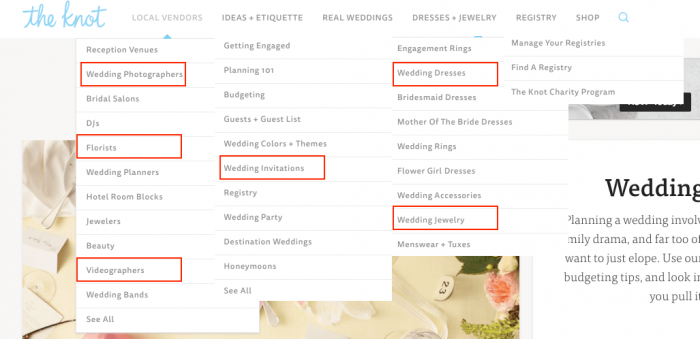
First, identify the most common navigation items and blog categories on leading industry sites.

Here’s a screenshot from The Knot:
Advanced search operators (3 minutes)

While exploring top websites, you can use advanced Google operators to dig deeper.

For example, Brides.com has topic pages such as “wedding beauty.” To view all of Brides.com’s topics, type “site:http://ift.tt/2nO5DTc; into Google:

Google suggestions (7 minutes)

Now, Google “wedding” — and don’t hit enter!

Instead, make a note of the drop-down search suggestions. To get the most popular and/or trending wedding related searches, you can also search “wedding a” (don’t hit enter), “wedding b” (don’t hit enter) … all the way to “wedding z.”

Once you’ve aggregated keywords by using the tactics above, you’ll have a solid list:

wedding venues, wedding photographers, wedding dj, wedding beauty, wedding videographers, wedding bands, wedding budget, wedding invitations, wedding registry, wedding colors, wedding decorations, wedding party, wedding ideas, wedding cakes, wedding centerpieces, wedding hairstyles, wedding bouquets, engagement rings, wedding dresses, bridesmaid dresses, mother of the bride dresses, wedding rings, flower girl dresses, wedding accessories, wedding jewelry, wedding tuxedos, wedding registry, wedding ceremony, wedding reception, wedding cake, wedding food, wedding favors, wedding flowers

Let’s determine which categories are most popular by average monthly Google searches.

In Google Keyword Planner or Moz Keyword Explorer, you can view average monthly search volume (how many times a query like “wedding flowers” is searched for a month).

Google Keyword Planner (5 minutes):

Step 1: In Google Keyword Planner, paste your saved keyword list into “Enter one or more of the following” and click “Get Ideas.”

Step 2: Evaluate and save search volume data while being mindful of the large search data ranges and limited data.

Note: Google will occasionally change your keywords to something different; “wedding videographers” was changed to “wedding videos” in this case. It’s important to make a note of those changes when you decide on the exact category names.

You should also explore the keywords below your immediate keyword search section. Sort by “Avg. monthly searches” (highest to lowest) to make sure you aren’t missing any other big categories.

Moz Keyword Explorer (7 minutes):

Step 1: In Moz Keyword Explorer, create a new list.

Step 2: Paste your keyword list into the “Enter Keywords” box.

Step 3: Have a quick water break, because Moz Keyword Explorer will take a minute to gather data. Once the data is ready, sort by and evaluate average monthly search volume.

To set our blog categories, we need to finalize:

  • Which topics are the most popular?
  • Which topics are the most relevant for a wedding planner site?

With those questions in mind, I’ve chosen six of the most popular wedding topics, and there are several sub-categories within “Wedding Decorations.”

  1. Wedding Dresses
  2. Wedding Invitations
  3. Wedding Photography
  4. Wedding Cakes
  5. Wedding Venues
  6. Wedding Decorations (Wedding Flowers, Wedding Colors, Wedding Centerpieces, Wedding Venues)

Hack #2: FAQ keyword research

Answering the questions that are most commonly searched about your product or service will provide value to your readers and solidify you as an authority in your niche.

Here’s how to gather the most commonly asked questions on a topic.

Use AnswerThePublic.com (10 minutes)

Search for your product or service on AnswerThePublic.

While the visuals in the snazzy question wheel above are fun, it’s easier to review the questions by clicking the top right, yellow “export to csv” button and deleting the extra questions you don’t need.

Moz Keyword Explorer (10 minutes)

Step 1: Search and filter “display keyword suggestions” by “are questions.”

Step 2: Add relevant questions to a new keyword list.

Step 3: Add relevant AnswerThePublic questions to the list.

Your research is done!

I wouldn’t worry about evaluating search volume too closely for FAQs because questions are typically more long tail (they have a lower search volume and are usually easier to rank for). Which, in multitudes, can be very valuable to your site.

Now you can start adding your newly discovered FAQs to an FAQ page. (Try to avoid very similar types of questions.)

Hack #3: Competitive content research

Ready to glean insights from your competitor?

Evaluate your competitor’s 10 most popular pages on SimilarWeb (5 minutes)

SimilarWeb allows you to uncover the specific type of content your audience finds on a competitor’s website.

Here are the 10 most popular pages on OneFineDayEvents.com:

Evaluate each of the top pages and gather three takeaways (20 minutes)

What should Hunter & Company observe?

  1. Images. The most popular “Gallery” page confirms that images are extremely popular in the wedding and event space. Maintaining an optimized gallery and incorporating more images into content should be a top priority.
  2. Category pages. Notice that the “Preferred Vendors” page is a Category page. It’s something Hunter & Company should consider adding to their site as well.
  3. Testimonials. Hunter & Company can collect testimonials to display.

Pro Tip: Use Google Trends to evaluate seasonal searches and prepare competitive content months before it spikes.

Hack #4: Keep up with “no click” Google searches

We are seeing a big rise in “no click” Google searches.

Here are charts from The State of Searcher Behavior Revealed Through 23 Remarkable Statistics:

“No click” searches occur when individuals search for something — and find their answer — without ever clicking on a search result.

For example, if you search for “Denver weather,” Google will show you an eight-day weather forecast. Most searchers are satisfied with that and leave, resulting in a “no click” Google search.

“No click” searches are rising because Google continues to provide answers within Search Features like: Featured Snippets (answer boxes), “People Also Ask” Boxes, Knowledge Graphs, Weather Forecasts, etc.

Know which Search Features show up most often for your keywords (5 minutes)

Knowing which Search Features occur most frequently for searches related to your product or service can help you optimize for them.

Keep in mind that if you are page one or two of a desired Featured Snippet search, you are in a better position to get that Featured Snippet (than if you are on page three or further down in search results).

Remember our FAQs about “wedding planning” above? The majority of questions found in Moz Keyword Explorer have Featured Snippets (answer boxes) in their search results:

RealSimple.com currently has a large Featured Snippet for the keyword term “wedding checklist.”

Brainstorm a better wedding checklist (15 minutes)

How could Hunter & Company create a more useful checklist? They could:

  • Hire a freelance developer to create a printable wedding checklist calendar that, once a reader enters their wedding date, populates with scheduled to-do list items
  • Create an IFTTT (If This Then That) recipe to schedule Google Calendar To-Do Reminders based on the user’s wedding date
  • Provide a more beautiful, detailed, user-friendly wedding checklist for their site

Over to you …

Which keyword research method are you most looking forward to trying?

After you’ve performed one of the hacks above, report back and let us know about any interesting discoveries you’ve made.
The post Schedule 30 Minutes to Uncover the Keys to More Powerful Content appeared first on Copyblogger.


from Copyblogger http://ift.tt/2n3Lgl0
via IFTTT